Covariance Functions
Covariance functions (kernels) describe the correlation structure of a stochastic process. They are the building blocks for Gaussian process simulation, Kriging, and kernel-based smoothing. fdars provides kernel-based covariance matrix construction and Gaussian process sample generation, all computed in Rust.
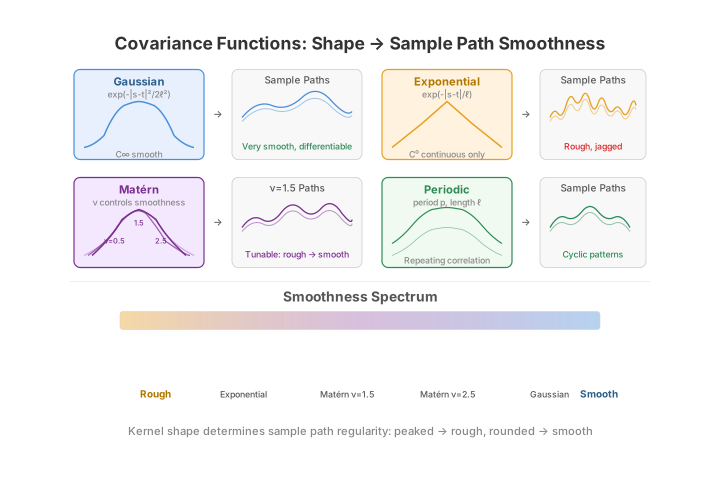
Available kernels
| Kernel | Formula | Character |
|---|---|---|
| Gaussian (squared exponential) | \(C(s,t) = \sigma^2 \exp\!\bigl(-\tfrac{(s-t)^2}{2\ell^2}\bigr)\) | Infinitely smooth sample paths |
| Exponential | $C(s,t) = \sigma^2 \exp!\bigl(-\tfrac{ | s-t |
| Matern (\(\nu=1.5\)) | $C(s,t) = \sigma^2 \bigl(1 + \tfrac{\sqrt{3}\, | s-t |
| Periodic | $C(s,t) = \sigma^2 \exp!\bigl(-\tfrac{2\sin^2(\pi | s-t |
In all formulas, \(\ell\) is the length scale and \(\sigma^2\) is the variance.
Computing a covariance matrix
import numpy as np
from fdars.simulation import covariance_matrix

argvals = np.linspace(0, 1, 100)

# Gaussian kernel
cov_gauss = covariance_matrix(argvals, kernel="gaussian", length_scale=0.2, variance=1.0)

# Exponential kernel
cov_exp = covariance_matrix(argvals, kernel="exponential", length_scale=0.2, variance=1.0)

print(f"Shape: {cov_gauss.shape}")           # (100, 100)
print(f"Symmetric: {np.allclose(cov_gauss, cov_gauss.T)}")  # True

# Ground-truth checks against the closed-form Gaussian kernel:
S, T = np.meshgrid(argvals, argvals, indexing="ij")
ref = np.exp(-(S - T) ** 2 / (2 * 0.2 ** 2))            # σ²=1, ℓ=0.2
assert np.allclose(cov_gauss, ref)                     # matches the analytic formula
assert np.allclose(np.diag(cov_gauss), 1.0)            # C(t, t) = σ²
Parameters
| Parameter | Type | Default | Description |
|---|---|---|---|
argvals |
ndarray (m,) |
-- | Evaluation grid |
kernel |
str |
"gaussian" |
"gaussian" or "exponential" |
length_scale |
float |
0.2 |
Kernel length scale \(\ell\) |
variance |
float |
1.0 |
Kernel variance \(\sigma^2\) |
Returns an ndarray of shape (m, m).
The Gaussian and exponential kernels have very different off-diagonal decay, which is visible as broader vs. sharper structure around the diagonal of the covariance surface.
The Gaussian surface is smooth and broad -- correlation decays gradually away from the diagonal -- whereas the exponential surface is visibly sharper, concentrating correlation tightly along \(s = t\). That contrast in off-diagonal decay is exactly what makes Gaussian paths smooth and exponential paths rough.
Effect of length scale
A small \(\ell\) produces rapidly varying (wiggly) functions; a large \(\ell\) produces smooth, slowly varying functions.
The length scale \(\ell\) is the single most important knob: it sets the distance over which function values stay correlated. The panels below draw the same seed at three length scales, so the only difference is how quickly the paths wiggle.
import numpy as np
from docs_fig import fig, render
from fdars.simulation import gaussian_process

t = np.linspace(0, 1, 200)
scales = [0.05, 0.2, 0.5]

f, axes = fig(1, 3, figsize=(11.5, 3.4), sharey=True)
for ax, ls in zip(axes, scales):
    paths = np.asarray(gaussian_process(5, t, kernel="gaussian",
                                        length_scale=ls, variance=1.0, seed=42))
    ax.plot(t, paths.T, lw=1.1, alpha=0.85)
    ax.set(title=f"length_scale = {ls}", xlabel="t")
axes[0].set_ylabel("X(t)")
print(render(f))
As \(\ell\) grows from 0.05 to 0.5 the sample paths go from jagged to gently undulating, even though the seed (and hence the underlying randomness) is identical.
Generating Gaussian process samples
gaussian_process draws \(n\) sample paths from a zero-mean GP with the specified kernel. The function internally constructs the covariance matrix and performs a Cholesky decomposition.
from fdars import Fdata
from fdars.simulation import gaussian_process

argvals = np.linspace(0, 1, 200)

# 50 smooth curves (Gaussian kernel)
fd_gauss = Fdata(gaussian_process(50, argvals, kernel="gaussian", length_scale=0.15, seed=1), argvals=argvals)

# 50 rough curves (exponential kernel)
fd_exp = Fdata(gaussian_process(50, argvals, kernel="exponential", length_scale=0.15, seed=1), argvals=argvals)

# 50 Matern curves
fd_mat = Fdata(gaussian_process(50, argvals, kernel="matern", length_scale=0.15, seed=1), argvals=argvals)

# 50 periodic curves
fd_per = Fdata(gaussian_process(50, argvals, kernel="periodic", length_scale=0.15, seed=1), argvals=argvals)
Parameters
| Parameter | Type | Default | Description |
|---|---|---|---|
n |
int |
-- | Number of sample paths |
argvals |
ndarray (m,) |
-- | Evaluation grid |
kernel |
str |
"gaussian" |
"gaussian", "exponential", "matern", or "periodic" |
length_scale |
float |
0.2 |
Kernel length scale |
variance |
float |
1.0 |
Kernel variance |
seed |
int |
None |
Random seed (omit for non-deterministic) |
Returns an ndarray of shape (n, m).
Comparing kernel shapes
Sample paths reveal each kernel's character: the Gaussian kernel gives infinitely smooth curves, the exponential kernel rough (non-differentiable) ones, the Matern kernel sits in between, and the periodic kernel produces repeating structure.
Looking at a single row of the covariance matrix -- \(C(0.5, t)\), the correlation of the midpoint with every other point -- makes the decay rate explicit: the Gaussian kernel falls off smoothly and quadratically near the diagonal, while the exponential kernel has a sharp cusp at \(s = t\), which is exactly why its sample paths are non-differentiable.
import numpy as np
from docs_fig import fig, render
from fdars.simulation import covariance_matrix

t = np.linspace(0, 1, 200)
mid = len(t) // 2

f, ax = fig(figsize=(7.2, 3.6))
for kern, color in [("gaussian", "#3f51b5"), ("exponential", "#e8710a")]:
    cov = np.asarray(covariance_matrix(t, kernel=kern, length_scale=0.15, variance=1.0))
    ax.plot(t, cov[mid, :], color=color, lw=1.8, label=f"{kern} C(0.5, t)")
ax.set(title="Covariance cross-section at s = 0.5", xlabel="t", ylabel="C(0.5, t)")
ax.legend()
print(render(f))
The cross-section makes the roughness mechanism concrete: the Gaussian curve leaves the diagonal with zero slope (a rounded top), so nearby values are almost perfectly correlated, while the exponential curve descends with a sharp corner at \(t = 0.5\), and it is precisely that non-smooth peak in the covariance that transmits non-differentiability to the sample paths.
Empirical covariance and its eigenstructure
Given an observed sample, the empirical covariance \(\hat C(s,t)\) is the sample covariance of the curve values across observations, estimated from \(n\) centred curves as
Its spectral decomposition \(\hat C\,\phi_k = \lambda_k\,\phi_k\) is the
basis of functional PCA: the leading eigenfunctions \(\phi_k\) are the dominant modes of variation
and the eigenvalues \(\lambda_k\) give the variance each mode explains. (covariance_matrix builds a
theoretical kernel; here we estimate \(\hat C\) from data with plain numpy.)
import numpy as np
from docs_fig import fig, render
from fdars.simulation import gaussian_process

t = np.linspace(0, 1, 100)
X = np.asarray(gaussian_process(120, t, kernel="gaussian",
                                length_scale=0.15, variance=1.0, seed=1))

# Empirical covariance surface and its eigendecomposition
Xc = X - X.mean(0)
C = (Xc.T @ Xc) / (X.shape[0] - 1)
evals, evecs = np.linalg.eigh(C)
evals, evecs = evals[::-1], evecs[:, ::-1]          # descending
explained = evals[:5] / evals.sum()

f, (a0, a1) = fig(1, 2, figsize=(10.5, 4.0))
im = a0.imshow(C, origin="lower", extent=(0, 1, 0, 1), cmap="viridis", aspect="equal")
a0.grid(False)
a0.set(title="Empirical covariance Ĉ(s, t)", xlabel="s", ylabel="t")
f.colorbar(im, ax=a0, fraction=0.046, pad=0.04)
for k in range(3):
    a1.plot(t, evecs[:, k], lw=1.8, label=f"φ{k+1} ({explained[k]:.0%})")
a1.set(title="Leading eigenfunctions of Ĉ", xlabel="t", ylabel="φ(t)")
a1.legend()
print(render(f))
The first three eigenfunctions here already account for the bulk of the variance -- a GP with a moderate length scale is effectively low-dimensional, which is what makes FPCA and the FPCA-based methods elsewhere in this section work so well.
Karhunen--Loève simulation
The flip side of the eigendecomposition is synthesis: the Karhunen--Loève expansion builds curves as
with independent standard-normal scores \(\xi_k\). sim_kl does this given a set of basis
functions \(\phi_k\) (columns) and eigenvalues \(\lambda_k\) -- letting you dial the
smoothness directly through the eigenvalue decay rather than through a kernel.
import numpy as np
from docs_fig import fig, render
from fdars.simulation import eigenfunctions, eigenvalues, sim_kl

t = np.linspace(0, 1, 120)
n_basis = 6
phi = np.asarray(eigenfunctions(t, n_basis, efun_type="fourier"))   # (m, n_basis)
lam = np.asarray(eigenvalues(n_basis, eval_type="linear"))          # decay 1, 1/2, 1/3, ...

X = np.asarray(sim_kl(8, phi, n_basis, lam, seed=1))                # (8, m)

f, ax = fig()
ax.plot(t, X.T, lw=1.2, alpha=0.85)
ax.set(title=f"Karhunen–Loève samples ({n_basis} Fourier modes, linear eigenvalue decay)",
       xlabel="t", ylabel="X(t)")
print(render(f))
Faster eigenvalue decay concentrates variance in the first few modes and yields smoother curves; slower decay spreads energy into higher-frequency modes and roughens them. This is the same trade-off the kernel length scale controls, expressed in the spectral domain.
Kernel coverage
covariance_matrix supports the string kernels "gaussian" and "exponential",
and gaussian_process additionally accepts "matern" and "periodic". For the
full R kernel library -- including Brownian, linear, polynomial and white-noise
kernels, plus composition -- use the fdars.covariance module. It exposes
kernel_gaussian, kernel_exponential, kernel_matern, kernel_periodic,
kernel_brownian, kernel_linear, kernel_polynomial and kernel_whitenoise
as callable kernels, the combinators kernel_add / kernel_mult, and
make_gaussian_process to draw samples from any of them (matching the R
kernel.add/kernel.mult API).
The callable kernels let you compose spectra directly rather than reaching for
sim_kl. Here a Matern process (nu=1.5) is drawn on its own, and a composite
kernel -- a smooth Matern trend plus a periodic component via kernel_add --
is sampled through make_gaussian_process:
import numpy as np
from docs_fig import fig, render
from fdars.covariance import (
    kernel_matern, kernel_periodic, kernel_add, make_gaussian_process,
)

t = np.linspace(0, 1, 200)

# A plain Matern(nu=1.5) process.
k_matern = kernel_matern(lengthscale=0.15, nu=1.5)
X_matern = np.asarray(make_gaussian_process(t, k_matern, n=6, seed=1))

# Compose: smooth Matern trend + periodic seasonal wiggle.
k_composite = kernel_add(
    kernel_matern(lengthscale=0.40, nu=2.5),
    kernel_periodic(lengthscale=0.5, period=0.2, variance=0.3),
)
X_composite = np.asarray(make_gaussian_process(t, k_composite, n=6, seed=2))

f, (ax1, ax2) = fig(ncols=2)
ax1.plot(t, X_matern.T, lw=1.2, alpha=0.85)
ax1.set(title="Matern (nu=1.5)", xlabel="t", ylabel="X(t)")
ax2.plot(t, X_composite.T, lw=1.2, alpha=0.85)
ax2.set(title="kernel_add(Matern, periodic)", xlabel="t")
print(render(f))
The left panel shows the once-differentiable roughness typical of nu=1.5; the
right panel keeps that smooth trend but overlays a period-0.2 oscillation, the
additive kernel showing through as a repeating ripple on each realisation.
Using GP samples for simulation studies
GP samples provide a convenient way to create realistic synthetic functional data for benchmarking FDA methods. Here is a complete example that generates data from two different kernels and compares clustering results.
import numpy as np
from fdars import Fdata
from fdars.simulation import gaussian_process
from fdars.clustering import kmeans_fd, silhouette_score
from fdars.metric import lp_self_1d

argvals = np.linspace(0, 1, 150)

# Group 1: smooth Gaussian kernel
g1 = gaussian_process(30, argvals, kernel="gaussian", length_scale=0.25, seed=1)

# Group 2: rough exponential kernel + vertical shift
g2 = gaussian_process(30, argvals, kernel="exponential", length_scale=0.10, seed=2) + 2.0

fd = Fdata(np.vstack([g1, g2]), argvals=argvals)

# Cluster
km = kmeans_fd(fd.data, fd.argvals, k=2, seed=42)
print(f"Converged: {km['converged']}, iterations: {km['iter']}")

# Evaluate
dist = lp_self_1d(fd.data, fd.argvals)
labels = km["cluster"].astype(np.int64)
sil = silhouette_score(dist, labels)
print(f"Mean silhouette: {np.mean(sil):.3f}")
Performance
Generating 1000 GP samples on a 500-point grid takes roughly 50 ms. The bottleneck is the Cholesky decomposition of the \(m \times m\) covariance matrix, which is \(O(m^3)\).
See also
- Tolerance bands and GMM clustering -- both rely on the eigenstructure of \(\hat C\) (FPCA scores) shown above.
- Seasonal analysis -- the periodic kernel is the stochastic counterpart of the deterministic periodicity analysed there.
References
- Rasmussen, C.E., Williams, C.K.I. (2006). Gaussian Processes for Machine Learning. MIT Press.
- Ramsay, J.O., Silverman, B.W. (2005). Functional Data Analysis, 2nd ed. Springer.
- Yao, F., Müller, H.G., Wang, J.L. (2005). Functional data analysis for sparse longitudinal data. Journal of the American Statistical Association, 100(470), 577–590.