Outlier Detection
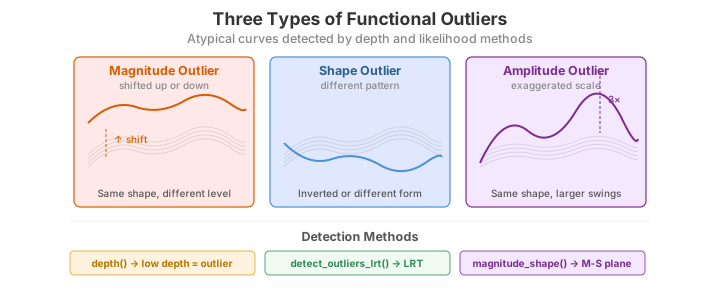
Functional outliers come in three flavours:
| Type | Description | Example |
|---|---|---|
| Magnitude | The curve lies far above or below the bulk of the data | A temperature sensor reading 20 degrees higher than all others |
| Shape | The curve has an unusual pattern even if its overall level is normal | A growth curve that dips where all others rise |
| Amplitude | The curve has exaggerated peaks and troughs | A vibration signal with double the usual amplitude |
The distinction is not merely descriptive. A magnitude outlier is a curve \(X_i(t)\)
whose level is shifted, \(X_i(t) \approx \mu(t) + c\) with \(|c|\) large; a shape outlier
tracks the population mean in level but departs in its form, and an amplitude outlier
scales the variation, \(X_i(t) \approx \mu(t) + \gamma\,[\,g(t)-\mu(t)\,]\) with \(\gamma\)
far from \(1\). No single scalar summary separates all three, so fdars provides several
complementary detectors, each best at a different quadrant of this space.
| Method | Function | Targets | Output geometry |
|---|---|---|---|
| Likelihood-ratio test | detect_outliers_lrt |
magnitude | 1-D distance vs. bootstrap threshold |
| Outliergram | outliergram |
shape | MEI–MBD plane, parabolic boundary |
| Magnitude–shape plot | magnitude_shape |
magnitude and shape | 2-D directional-outlyingness plane |
LRT-based detection
Theory
Following Febrero, Galeano & González-Manteiga (2008), each curve is scored by its
distance from a robust centre and compared against a bootstrap null. Let \(D_i\) be a
functional depth (larger = more central) and let the reference set be the \(1-\alpha_{\text{trim}}\)
deepest curves, so that the trimmed mean \(\hat\mu_{\text{trim}}(t)\) excludes the least
central trim-fraction. Each curve's outlyingness is its \(L^2\) distance from that robust
centre,
The test statistic is the maximum distance \(M = \max_i d_i\). Its null distribution —
what \(M\) looks like when there are no outliers — is obtained by a smoothed bootstrap:
resample curves from the trimmed reference, add Gaussian noise with bandwidth smo
(this is the \(\gamma\) smoothing that widens the resampled population so the null is not
degenerate), recompute \(M^{(b)}\) for \(b = 1,\dots,B\), and take the threshold as the
\((1-\alpha)\) quantile
Any curve with \(d_i > \hat C_{1-\alpha}\) is flagged. Because the reference is trimmed and the null is smoothed, the test targets magnitude outliers — curves shifted up or down — and is comparatively blind to pure shape or amplitude anomalies. A per-curve p-value is the tail mass \(\hat p_i = \tfrac1B\sum_b \mathbf 1\{M^{(b)} \ge d_i\}\).
import numpy as np
from docs_fig import fig, render
from fdars.outliers import detect_outliers_lrt_with_dist

# Low-noise sinusoids with one magnitude outlier (curve 0 shifted up by 3)
rng = np.random.default_rng(1)
t = np.linspace(0, 1, 100)
X = np.array([np.sin(2 * np.pi * t) + rng.normal(0, 0.1, t.size) for _ in range(30)])
X[0] = np.sin(2 * np.pi * t) + 3.0

res = detect_outliers_lrt_with_dist(X, alpha=0.05, n_bootstrap=300, smo=0.1, seed=1)
null = np.asarray(res["null_distribution"])
thr = float(res["threshold"])
flagged = np.where(np.asarray(res["outliers"]))[0]

f, (a0, a1) = fig(1, 2, figsize=(11.0, 3.8))
for i, xi in enumerate(X):
    a0.plot(t, xi, color="#dc3545" if i in flagged else "#6c757d",
            lw=1.6 if i in flagged else 0.7, alpha=0.9 if i in flagged else 0.35)
a0.set(title=f"Curves (LRT flagged: {flagged.tolist()})", xlabel="t", ylabel="X(t)")

a1.hist(null, bins=25, color="#3f51b5", alpha=0.7)
a1.axvline(thr, color="#dc3545", ls="--", lw=1.6, label=f"threshold {thr:.1f}")
a1.set(title="Bootstrap null distribution of max distance",
       xlabel="max distance from robust centre", ylabel="count")
a1.legend()
print(render(f))
Parameters
| Parameter | Type | Default | Description |
|---|---|---|---|
data |
ndarray (n, m) |
-- | Functional observations |
alpha |
float |
0.05 |
Significance level |
n_bootstrap |
int |
200 |
Number of bootstrap replicates for threshold estimation |
trim |
float |
0.1 |
Trimming proportion for the robust mean |
smo |
float |
0.02 |
Smoothing parameter for the likelihood ratio |
detect_outliers_lrt returns {"outliers": bool[n], "threshold": float};
detect_outliers_lrt_with_dist additionally returns null_distribution (the bootstrap
max-distances used to set the threshold), as plotted above.
The LRT can mask a lone outlier at the default smoothing
Two behaviours are worth knowing before you trust a negative result:
- Smoothing matters. With the default
smo=0.02, even a large single magnitude outlier can go undetected; raisingsmoto about0.1restores detection in the example above. Sweepsmoif the LRT reports nothing. - Masking/swamping. A single very extreme curve inflates the bootstrap null (it is resampled into the reference), pushing the threshold up so far that it hides itself. This is a known limitation of single-pass outlier tests; corroborate the LRT with the outliergram and the magnitude--shape plot below rather than relying on it alone.
Depth-based detectors are R-only for now
The R reference also offers packaged depth-based detectors (outliers.depth.pond,
outliers.depth.trim) that flag curves with unusually low functional depth. These have
no one-call Python binding in the current fdars build. You can reproduce the idea
faithfully, though, with fdars.depth plus a robust cutoff on the depths, as below.
Depth distribution and a depth-based cutoff (numpy)
Febrero et al.'s depth detectors rest on a simple premise: outliers are curves of
unusually low functional depth. We compute a Fraiman–Muniz depth for every curve and
flag those below a robust median-minus-\(k\cdot\)MAD fence — the same mad threshold rule
the R outliers.depth.pond exposes. This mirrors the R article's depth-distribution
figure while being fully transparent about the (numpy) cutoff.
import numpy as np
from docs_fig import fig, render
from fdars.simulation import simulate
from fdars.depth import fraiman_muniz_1d

t = np.linspace(0, 1, 100)
X = np.asarray(simulate(40, t, n_basis=5, seed=11))
X[0] += 6.0                          # magnitude outlier -> shallow depth
X[1] = 3.0 * np.sign(np.sin(2 * np.pi * 4 * t))  # square-wave shape outlier

depth = np.asarray(fraiman_muniz_1d(X, X))
med, mad = np.median(depth), np.median(np.abs(depth - np.median(depth)))
cutoff = med - 2.5 * mad                 # robust "mad" fence, k = 2.5
low = depth < cutoff

f, (a0, a1) = fig(1, 2, figsize=(11.0, 3.8))
for i, xi in enumerate(X):
    a0.plot(t, xi, color="#dc3545" if low[i] else "#6c757d",
            lw=1.6 if low[i] else 0.7, alpha=0.9 if low[i] else 0.3)
a0.set(title=f"Curves (low-depth flagged: {np.where(low)[0].tolist()})",
       xlabel="t", ylabel="X(t)")

a1.hist(depth, bins=20, color="#3f51b5", alpha=0.7)
a1.axvline(cutoff, color="#dc3545", ls="--", lw=1.6,
           label=f"median - 2.5·MAD = {cutoff:.2f}")
a1.set(title="Fraiman-Muniz depth distribution", xlabel="depth", ylabel="count")
a1.legend()
print(render(f))
The fence catches both the injected outliers: curve 0 (the level-shifted magnitude
outlier) and curve 1 (the square-wave shape outlier, which repeatedly runs out to the
pointwise extremes and so earns a low Fraiman–Muniz depth). It also flags one extra
curve near the bottom of the bundle -- a genuine but unremarkable member of the sample
that simply lives on the low-depth tail. That is characteristic of a raw MAD fence:
Fraiman–Muniz depth is a pointwise-centrality measure, so a shape outlier is only caught
when it strays far from the cross-sectional median, and a tight fence will occasionally
swamp a normal-but-peripheral curve. Corroborate with the band-depth outliergram and the
magnitude--shape plot below, which are built for shape departures.
Outliergram (MEI vs MBD)
Theory
The outliergram (Arribas-Gil & Romo, 2014) is a shape detector built from two band-depth statistics. For a sample of \(n\) curves the Modified Band Depth of curve \(X_i\) measures, across all pairs of reference curves, the proportion of the domain on which \(X_i\) lies inside the band they span:
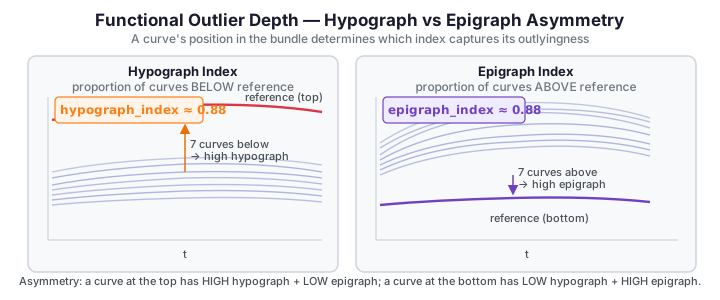
where \(\lambda\) is Lebesgue measure on the domain. The Modified Epigraph Index is the average proportion of the domain on which curve \(X_i\) lies below the other curves,
The key fact that makes the plot work: for non-crossing curves MBD and MEI satisfy an exact quadratic relationship. Every well-behaved curve sits on the parabola
A curve that crosses others — the signature of a shape outlier — has lower band depth
than its epigraph index predicts and therefore falls below the parabola. The
outliergram flags curves by their vertical distance to the parabola,
\(d_i = \hat{\mathrm{MBD}}(\mathrm{MEI}_i) - \mathrm{MBD}_i\), using a boxplot-style rule:
\(d_i\) exceeding the upper quartile by factor times the interquartile range marks an
outlier (the classic \(Q_3 + \texttt{factor}\cdot\mathrm{IQR}\) fence, factor = 1.5 by
default).
Depth scaling differs across implementations
The coefficients above are the canonical Arribas-Gil & Romo normalisation. The MBD
returned by fdars.depth.modified_band_1d uses its own internal scaling, so the raw
mbd/mei values from outliergram will not lie on exactly that parabola — the
detector fits and applies the boundary internally. Treat the formula as the geometry
the method exploits, not a literal check on the returned numbers.
Parameters
| Parameter | Type | Default | Description |
|---|---|---|---|
data |
ndarray (n, m) |
-- | Functional observations |
factor |
float |
1.5 |
Outlier factor (analogous to the IQR multiplier in a boxplot) |
Returns a dictionary:
| Key | Shape | Description |
|---|---|---|
mei |
(n,) |
Modified Epigraph Index |
mbd |
(n,) |
Modified Band Depth |
outliers |
(n,) bool |
Outlier flags |
The left panel shows the raw curves with a few injected anomalies; the right panel is the outliergram itself, where flagged curves sit far from the central parabola.
The red curves in the left panel are exactly the points the outliergram isolates on the right: shape outliers fall away from the parabolic MEI--MBD band that the bulk of the sample traces out, so a departure in the scatter plot corresponds to an atypical curve.
Choosing the factor
A factor of 1.5 (the default) mirrors the classic boxplot rule. Increase it to 2.0 or 3.0 if you want to be more conservative and only flag extreme shape departures.
Magnitude-shape outlyingness
Theory
The magnitude–shape plot (Dai & Genton, 2018) is built on directional outlyingness. At each time \(t\) define the pointwise outlyingness of curve \(X_i\) using a robust depth \(d\) (e.g. the halfspace or projection depth of \(X_i(t)\) within the cross-section \(\{X_1(t),\dots,X_n(t)\}\)), scaled and signed by the direction \(\mathbf v_i(t)\) pointing from the pointwise median toward \(X_i(t)\):
Integrating over the domain splits this into a location term and a variability term. The mean directional outlyingness captures magnitude (how far, and in which direction, a curve sits from the centre on average),
while the variation of directional outlyingness captures shape (how much a curve's outlyingness fluctuates across the domain — large when a curve crosses the bulk),
magnitude_shape returns \(\lVert\mathrm{MO}\rVert\) as magnitude and \(\mathrm{VO}\) as
shape. A pure magnitude outlier has large \(\lVert\mathrm{MO}\rVert\) but small
\(\mathrm{VO}\); a shape outlier has the reverse. Because both live on one plane, a single
scatter tells you why a curve is outlying, not just that it is. The two statistics can
be combined into a Mahalanobis-type distance whose null is approximately \(\chi^2\), giving
a principled cutoff, but here we threshold each axis directly.
Parameters
| Parameter | Type | Default | Description |
|---|---|---|---|
data |
ndarray (n, m) |
-- | Functional observations |
Returns a dictionary:
| Key | Shape | Description |
|---|---|---|
magnitude |
(n,) |
Magnitude outlyingness score for each curve |
shape |
(n,) |
Shape outlyingness score for each curve |
You can flag outliers by thresholding either component (e.g., values above the 97.5th percentile):
mag_threshold = np.percentile(result_ms["magnitude"], 97.5)
shape_threshold = np.percentile(result_ms["shape"], 97.5)
mag_outliers = result_ms["magnitude"] > mag_threshold
shape_outliers = result_ms["shape"] > shape_threshold
print(f"Magnitude outliers: {np.where(mag_outliers)[0]}")
print(f"Shape outliers:     {np.where(shape_outliers)[0]}")
The magnitude-shape plot spreads outlyingness across two axes, so magnitude anomalies separate horizontally and shape anomalies vertically.
The two axes separate two failure modes: points far to the right are magnitude outliers (shifted up or down as a whole), while points high up the vertical axis are shape outliers (atypical curvature at a normal level), and a curve extreme on either axis is flagged.
The three outlier types, in isolation
To see which method responds to which anomaly, inject a single outlier of each type into an otherwise clean low-noise sinusoidal sample and show all three side by side: a magnitude shift (+3), a shape inversion, and a 3x amplitude scaling.
import numpy as np
from docs_fig import fig, render

t = np.linspace(0, 1, 100)

def clean(seed, n=30):
    rng = np.random.default_rng(seed)
    return np.array([np.sin(2 * np.pi * t) + rng.normal(0, 0.1, t.size) for _ in range(n)])

cases = [
    ("Magnitude (+3 shift)", lambda X: X.__setitem__(0, np.sin(2 * np.pi * t) + 3.0)),
    ("Shape (inverted)",     lambda X: X.__setitem__(0, -np.sin(2 * np.pi * t))),
    ("Amplitude (3x)",       lambda X: X.__setitem__(0, 3.0 * np.sin(2 * np.pi * t))),
]

f, axes = fig(1, 3, figsize=(12, 3.4), sharex=True)
for ax, (title, inject) in zip(axes, cases):
    X = clean(7)
    inject(X)
    ax.plot(t, X[1:].T, color="#6c757d", lw=0.6, alpha=0.4)
    ax.plot(t, X[0], color="#dc3545", lw=2.0, label="outlier")
    ax.set(title=title, xlabel="t")
    ax.legend(loc="upper right")
axes[0].set_ylabel("X(t)")
print(render(f))
The magnitude outlier stands off vertically (LRT territory), the shape outlier tracks the same level but runs anti-phase (outliergram territory), and the amplitude outlier keeps the same phase but oscillates harder. No single detector is best at all three, which is why the recommendation below is to run more than one.
Full example -- detect and visualize outliers
Run all three detectors on the same contaminated sample and compare what each flags. We use a low-noise sinusoidal base (the regime where the LRT is well-behaved) with one magnitude, one shape, and one amplitude outlier.
import numpy as np
from fdars.outliers import detect_outliers_lrt, outliergram, magnitude_shape

t = np.linspace(0, 1, 100)
rng = np.random.default_rng(42)
X = np.array([np.sin(2 * np.pi * t) + rng.normal(0, 0.1, t.size) for _ in range(30)])
X[0] = np.sin(2 * np.pi * t) + 3.0     # magnitude outlier
X[1] = -np.sin(2 * np.pi * t)          # shape outlier (inverted)
X[2] = 3.0 * np.sin(2 * np.pi * t)     # amplitude outlier

# LRT (raise smo so a lone magnitude outlier is not masked)
lrt = detect_outliers_lrt(X, alpha=0.05, n_bootstrap=300, smo=0.1)
print("LRT outliers        :", np.where(lrt["outliers"])[0].tolist())

# Outliergram (shape)
og = outliergram(X, factor=1.5)
print("Outliergram outliers:", np.where(np.asarray(og["outliers"]))[0].tolist())

# Magnitude-shape ranking
ms = magnitude_shape(X)
mag, shp = np.asarray(ms["magnitude"]), np.asarray(ms["shape"])
print("Top |magnitude| idx :", np.argsort(np.abs(mag))[-3:][::-1].tolist())
print("Top |shape| idx     :", np.argsort(np.abs(shp))[-3:][::-1].tolist())
LRT outliers : [0] Outliergram outliers: [1, 2] Top |magnitude| idx : [0, 1, 2] Top |shape| idx : [0, 1, 2]
The three detectors flag overlapping but distinct index sets: LRT and the magnitude ranking converge on the level-shifted curve, while the outliergram and the shape ranking pick out the curvature anomaly -- confirming that no single method dominates and that they are best read together.
Which method to use?
- LRT (
detect_outliers_lrt): magnitude outliers, but tunesmo(≈0.1) and treat a negative result cautiously (masking). Usedetect_outliers_lrt_with_distwhen you want to see the bootstrap null. - Outliergram (
outliergram): the go-to for shape outliers; interpretable 2D plot. - Magnitude-shape (
magnitude_shape): decomposes outlyingness onto two axes, so you can tell why a curve is outlying. - Run at least two, and corroborate. No single functional detector catches every outlier type.
Comparing outlierness scores across methods
The R article closes with a bar chart contrasting the per-curve outlierness assigned by
each method. Here is the Python analogue: for the same contaminated sample we normalise
each detector's score to \([0,1]\) and place the three side by side. The three injected
curves (indices 0–2) should light up, but which method scores them highest reveals the
division of labour — the magnitude distance peaks on the shifted curve, shape (VO) on
the inverted curve, and both flag the amplitude curve to a degree.
The LRT binding returns flags, not per-curve distances
detect_outliers_lrt_with_dist exposes outliers, threshold, and
null_distribution — but not the individual curve distances \(d_i\). For a
per-curve score we therefore stand in the underlying quantity transparently: the
\(L^1\) distance of each curve from the pointwise median, which is what the LRT
thresholds a robust version of.
import numpy as np
from docs_fig import fig, render
from fdars.outliers import outliergram, magnitude_shape

t = np.linspace(0, 1, 100)
rng = np.random.default_rng(3)
X = np.array([np.sin(2 * np.pi * t) + rng.normal(0, 0.1, t.size) for _ in range(30)])
X[0] = np.sin(2 * np.pi * t) + 3.0     # magnitude
X[1] = -np.sin(2 * np.pi * t)          # shape
X[2] = 3.0 * np.sin(2 * np.pi * t)     # amplitude

def unit(v):
    v = np.asarray(v, float)
    return (v - v.min()) / (np.ptp(v) + 1e-12)

og = outliergram(X, factor=1.5)
ms = magnitude_shape(X)

scores = {
    "Magnitude (L1 to median)": unit(np.abs(X - np.median(X, 0)).mean(1)),
    "Outliergram (|MEI-0.5|)": unit(np.abs(np.asarray(og["mei"]) - 0.5)),
    "MS shape (VO)": unit(ms["shape"]),
}

f, ax = fig(figsize=(9.5, 3.8))
idx = np.arange(len(X)); w = 0.27
for k, (name, s) in enumerate(scores.items()):
    ax.bar(idx + (k - 1) * w, s, width=w, label=name, alpha=0.85)
ax.axvspan(-0.5, 2.5, color="#dc3545", alpha=0.08)
ax.set(title="Per-curve outlierness by method (curves 0-2 are the injected outliers)",
       xlabel="curve index", ylabel="normalised score")
ax.legend(fontsize=8)
print(render(f))
The grouped bars over the shaded region (curves 0--2) show each method spiking on the anomaly it is designed to catch: the magnitude score peaks on curve 0, the outliergram score on the shape-inverted curve 1, and the MS shape score on the amplitude-scaled curve 2 -- a compact confirmation that the three diagnostics are complementary.
Functional-outlier detectors (v6.0)
The v6.0 release adds four new detectors to fdars.outliers, each exposing a distinct facet of functional outlyingness. Unlike the LRT and outliergram (which are permutation-based), these detectors are deterministic and take no argvals or seed parameters — they operate purely on the data matrix using the column spacing as the implicit grid.
tvdmss — Total Variation and Magnitude-Shape Score
tvdmss decomposes outlyingness into a total variation score (sensitivity to rough, irregular curves) and a magnitude-shape score (sensitivity to level shifts and shape changes).
| Parameter | Type | Default | Description |
|---|---|---|---|
data |
ndarray (n, m) |
— | Functional data matrix; no argvals or seed |
emp_factor_mss |
float |
1.5 |
Fence factor for the magnitude-shape score boxplot rule |
emp_factor_tvd |
float |
1.5 |
Fence factor for the total-variation depth boxplot rule |
central_region_tvd |
float |
0.5 |
Proportion defining the central TVD band |
Returns a dict with keys:
| Key | Type | Description |
|---|---|---|
magnitude_outliers |
list[int] |
Indices of magnitude-flagged outliers |
shape_outliers |
list[int] |
Indices of shape-flagged outliers |
tvd |
ndarray (n,) |
Per-curve total variation depth score |
mss |
ndarray (n,) |
Per-curve magnitude-shape score |
muod — Magnitude-Unaffected Outlyingness Decomposition
muod independently identifies shape, magnitude, and amplitude outliers through a depth-based decomposition. Requires \(n \ge 3\).
| Parameter | Type | Default | Description |
|---|---|---|---|
data |
ndarray (n, m) |
— | Functional data matrix; no argvals or seed; \(n \ge 3\) |
factor |
float |
1.5 |
Boxplot fence factor for all three outlier types |
Returns a dict with keys:
| Key | Type | Description |
|---|---|---|
shape_outliers |
list[int] |
Indices flagged as shape outliers |
magnitude_outliers |
list[int] |
Indices flagged as magnitude outliers |
amplitude_outliers |
list[int] |
Indices flagged as amplitude outliers |
shape_index |
ndarray (n,) |
Per-curve shape outlyingness score |
magnitude_index |
ndarray (n,) |
Per-curve magnitude outlyingness score |
amplitude_index |
ndarray (n,) |
Per-curve amplitude outlyingness score |
sequential_transform_outliers — Sequential Transform Screening
sequential_transform_outliers applies a sequence of transforms to the data (value, first derivative, second derivative, etc.) and flags curves that are outlying under any transform.
| Parameter | Type | Default | Description |
|---|---|---|---|
data |
ndarray (n, m) |
— | Functional data matrix |
transforms |
list[str] |
— | Transforms to apply; each must be one of "t0", "t1", "t2", "d1", "d2" |
depth_method |
str |
"modified_band" |
Depth method for outlier scoring; accepts all 13 functional_depth method strings |
emp_factor |
float |
1.5 |
Boxplot fence factor |
Parameter name: depth_method, not method
The parameter that selects the depth method is called depth_method, not method. Passing method="modified_band" raises a TypeError; always use depth_method=....
Transform codes: "t0" = values, "t1" = first derivative, "t2" = second derivative, "d1" = absolute value of first derivative, "d2" = absolute value of second derivative.
Returns a dict with keys:
| Key | Type | Description |
|---|---|---|
per_transform_outliers |
list[dict] |
One entry per transform; each has {"transform": str, "outliers": list[int]} |
union_outliers |
list[int] |
Union of all flagged indices across transforms |
depthgram — Depth-Gram (MBD/MEI Joint Outlier Plot)
depthgram computes the joint distribution of Modified Band Depth (MBD) and Modified Epigraph Index (MEI) and flags curves that fall outside the expected MBD–MEI parabola. Requires \(n \ge 2\).
| Parameter | Type | Default | Description |
|---|---|---|---|
data |
ndarray (n, m) |
— | Functional data matrix; \(n \ge 2\) |
outliergram_factor |
float |
1.5 |
Fence factor for the outliergram parabola |
boxplot_factor |
float |
1.5 |
Fence factor for the MBD boxplot |
Returns a dict with keys:
| Key | Type | Description |
|---|---|---|
shape_outliers |
list[int] |
Shape-outlying curve indices |
magnitude_outliers |
list[int] |
Magnitude-outlying curve indices |
mbd |
ndarray (n,) |
Per-curve Modified Band Depth |
mei |
ndarray (n,) |
Per-curve Modified Epigraph Index |
mbd_mei_d, mei_mbd_d, ... |
ndarray (n,) |
Additional joint-depth statistics (6 arrays total) |
Example: all four detectors on a contaminated sample
import numpy as np
from fdars.simulation import simulate
from fdars.outliers import tvdmss, muod, sequential_transform_outliers, depthgram

rng = np.random.default_rng(3)
t = np.linspace(0, 1, 60)
X = np.asarray(simulate(n=30, argvals=t, n_basis=4, seed=3))
X[0] += 3.0   # magnitude outlier
X[1] = -X[1]  # shape outlier

r_tv = tvdmss(X)
r_mu = muod(X)
r_st = sequential_transform_outliers(X, transforms=["t0", "d1"])
r_dg = depthgram(X)

print(f"tvdmss    magnitude_outliers={r_tv['magnitude_outliers']}")
print(f"muod      magnitude_outliers={r_mu['magnitude_outliers']}")
print(f"seq_trans union_outliers={r_st['union_outliers']}")
print(f"depthgram magnitude_outliers={r_dg['magnitude_outliers']}")
print("FDARS_FENCE_OK")
tvdmss magnitude_outliers=[] muod magnitude_outliers=[19] seq_trans union_outliers=[] depthgram magnitude_outliers=[] FDARS_FENCE_OK
The four detectors return overlapping but not identical flag sets, confirming that they screen different aspects of functional outlyingness. tvdmss and depthgram are particularly sensitive to magnitude shifts; sequential_transform_outliers catches shape anomalies through the derivative transforms ("d1", "d2"); muod separates magnitude, shape, and amplitude outlyingness into independent axes.
See also
- Tolerance bands -- a curve outside a tolerance band is, by construction, an outlier relative to the fitted population.
fdars.depth-- the band-depth and epigraph-index machinery underlying the outliergram.
References
- Febrero, M., Galeano, P., and González-Manteiga, W. (2008). "Outlier detection in
functional data by depth measures, with application to identify abnormal NOx levels."
Environmetrics, 19(4), 331–345. — the trimmed-depth + bootstrap LRT this page's
detect_outliers_lrtimplements. - Arribas-Gil, A., and Romo, J. (2014). "Shape outlier detection and visualization for
functional data: the outliergram." Biostatistics, 15(4), 603–619. — defines MEI, MBD,
and the MBD–MEI parabola used by
outliergram. - Dai, W., and Genton, M. G. (2018). "Multivariate functional outlier detection." (with
discussion) Statistical Methods & Applications, 27, 3–27; and Dai, W., and Genton,
M. G. (2018), "Functional boxplots for multivariate curves," — the directional-
outlyingness magnitude/shape decomposition behind
magnitude_shape. - Hyndman, R. J., and Shang, H. L. (2010). "Rainbow plots, bagplots, and boxplots for functional data." Journal of Computational and Graphical Statistics, 19(1), 29–45. — functional depth ranking and visual outlier diagnostics.