AI Advisor
The fdars AI Advisor is a grounded analysis advisor that interprets computed fdars diagnostics and recommends concrete parameter or method changes. Every number it cites comes from fdars — the LLM never fabricates values.
Grounding Invariant
fdars computes every number. The LLM only interprets and cites those values — it never fabricates numbers.
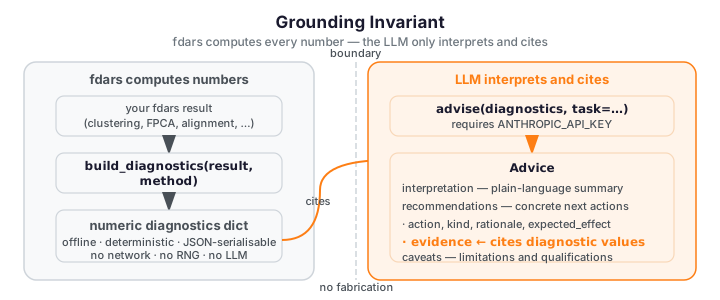
fdars computes every number via build_diagnostics — offline and deterministic.
The LLM in advise only interprets and cites those diagnostic values in each
Recommendation's evidence field. It never fabricates numbers.
The invariant is enforced at three levels:
- Schema:
Recommendation.evidenceis a requiredlist[str]field in the Pydantic model. The LLM cannot omit it; every recommendation must cite specific values present in the diagnostics dict. - System prompt: the grounding prompt instructs the model to include at least one evidence item per recommendation, to omit any claim not supported by a provided value, and to never estimate or assume numerical results not explicitly given in the diagnostics.
- Runtime guard: after the model responds,
adviseruns a programmatic grounding check (_check_grounding) that inspects everyRecommendation.evidenceitem and raisesGroundingViolationErrorif it cites a numeric value not present in the diagnostics dict. The check runs on every provider path, and it never retries on a violation — retrying a fabrication would only reward it. This makes "the LLM never fabricates numbers" a runtime-enforced guarantee, not just a prompt request: a hallucinated statistic raises rather than reaching the caller.
What the Advisor Does
The advisor works in two stages:
-
Offline diagnostics —
build_diagnostics(result, method)takes your fdars result dict and computes a deterministic, JSON-serialisable diagnostics dict from fdars and NumPy only. No network call, no API key, no randomness. Two calls on the same input return the same dict. All 14 fdars aspects are covered — clustering, smoothing, alignment, basis, fpca, represent, depth, outliers, classification, regression, regression_cv, spm, scoring, and inference — see Per-Aspect Coverage for the full diagnostics key sets. -
Grounded interpretation —
advise(diagnostics, task=…)routes those diagnostics through a uniform Provider protocol to any of four LLM backends (Anthropic, OpenAI/OpenAI-compatible, Google Gemini, or local Ollama) with a grounding-invariant system prompt, and returns a schema-validatedAdviceobject whose everyRecommendationcites specific values from the diagnostics dict. See Provider Setup for backend selection and credentials.
The describe_cluster_differences function is a convenience wrapper that runs
both stages in sequence for clustering results.
Three Surfaces
Python API
The Python API is the recommend-only surface. Call build_diagnostics to
produce the offline diagnostics report, then call advise (or
describe_cluster_differences) to get a schema-validated Advice object with
interpretation, recommendations, and caveats. The Python API returns
Advice and stops — it does not re-run fdars or compute a before/after delta.
See Python API for worked examples.
MCP Server
The MCP server exposes the advisor as three composable tools over stdio:
fdars_build_diagnostics— builds offline diagnostics from a registered dataset handle (no API key required). Covers all 14build_diagnosticsaspects.fdars_run_method— runs an fdars method and returns an opaque result handle. Arrays stay in-process; only the handle ID is returned.fdars_compare_run— re-runs the method with new parameters and returns a before/afterdeltadict of scalar numeric differences — all fdars-computed.
The MCP surface supports the full agentic loop: interpret → recommend → re-run → compare → interpret again.
See MCP Server for the tool reference.
Agent Skill
The Agent Skill (fdars-advisor) packages the full interpret → recommend →
re-run → compare walkthrough as a reusable Claude skill. It orchestrates the MCP
tools automatically and produces a before/after delta block alongside the grounded
recommendations. Install via git URL until the [mcp,advisor] extras ship to PyPI.
See Agent Skill for the walkthrough.
When to Use the Advisor
Use the advisor when you need:
- Parameter tuning — guidance on
lambda_,n_basis,n_comp, clusterk, or alignment bandwidth, grounded in your diagnostic values. - Method choice — to identify when the chosen method is a poor fit (e.g. linear FPCA absorbing phase variation) and to get a concrete alternative.
- Interpreting diagnostics — plain-language explanations of amplitude/phase balance, convergence, GCV curves, and explained variance.
- Before/after comparison — to confirm that an applied change improved the result by comparing the diagnostics delta across two runs.
How It Works
The full agentic workflow forms a closed loop:
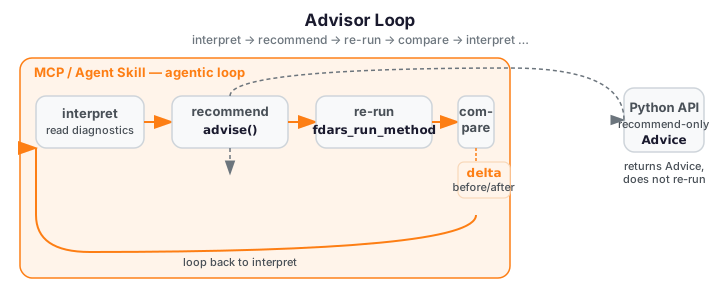
The Python API exits the loop after the recommend step — it returns an
Advice object and stops. The MCP server and Agent Skill continue through
re-run (fdars_run_method) and compare (fdars_compare_run), then feed the
updated diagnostics back into interpret for the next iteration.
Installation
Optional extras
The advisor is split into focused optional extras so you only install what you need. The core extra enables the Anthropic backend (default); additional extras unlock the other providers.
# Python API — Anthropic backend (default):
pip install "fdars[advisor]"

# OpenAI or OpenAI-compatible endpoints (vLLM, LM Studio, LocalAI):
pip install "fdars[openai]"

# Google Gemini (Python 3.10+ required):
pip install "fdars[gemini]"

# Local Ollama (no API key required):
pip install "fdars[ollama]"

# All four provider backends at once:
pip install "fdars[all-providers]"

# MCP server and Agent Skill (Python 3.10+ required):
pip install "fdars[mcp,advisor]"
The [advisor] extra installs anthropic>=0.72.0 and pydantic>=2.0.
The [mcp] extra additionally installs mcp>=2.0.0 and requires Python 3.10+.
See Provider Setup for backend selection, environment variables, and credential precedence.
Offline core vs. env-gated LLM
build_diagnostics and the run_llm=False path of describe_cluster_differences
work fully offline — no API key, no network connection. The grounded
interpretation step (advise) requires the selected provider's credential to be
set in your environment (none required for local Ollama). If the credential is
absent the function raises a clear ImportError with the install hint.